Roll cursor over data fields below for more info
|
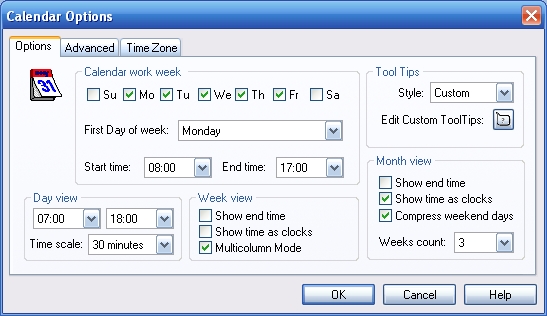
Calendar Options- Customize the calendar display.
Calendar Work Week- Define the work week. Select what days to displayed and designate the first day of the week. Select the time of day to start and end. Tool Tips- This feature allows you to determine what information is popped up and displayed when you scroll your mouse over an appointment. Style- Select between Standard, Custom, or disabled tooltips. Edit Custom Tool Tips- Select items to display in the tooltips and in what order. Day View- Define the calendar appearance when viewing a single day. Week View- Define the calendar appearance when viewing a week. Month View- Define the calendar appearance when viewing a month. |
 |
We collect information from you when you register on our site or fill out a form.
By using our site, you consent to our website privacy policy.