Roll cursor over data fields below for more info
|
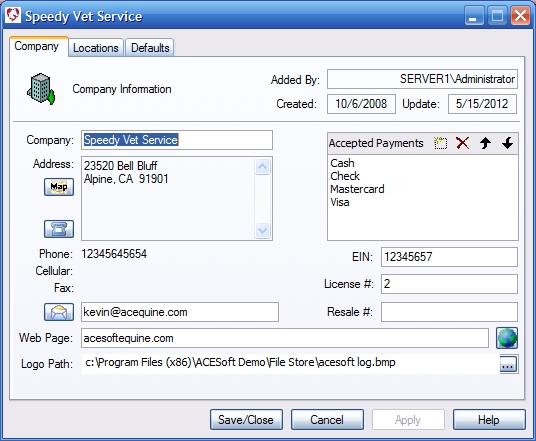
Overview-Enter your company's information. Much of this information is populated into other areas of the program.
Added By- Computer generated-Shows who created the record. Created- Computer generated - shows when the record was created. Update- Computer generated - shows when the record was last altered. Company- Enter your company name as you would like it to appear on invoices and other forms. Address and Phone information-This is populated from primary address data on the locations page. Map Button- Opens an internet map site and pinpoints the given location. Requires an active internet connection. Telephone button- If a modem connected to a phone or business telephone system (PBX) handset is installed this can provide dialing capabilities. Accepted Payments- List the types of payments you accept. EIN, License, and Resale Numbers- Enter the company'sr Federal Employer ID number, license number and resale cerificate number. Email- Enter the company email address here. Mail button- Sends email to addressee. Web Page- Enter the company website address. Web button- Opens the company web page in the default browser. |
 |
We collect information from you when you register on our site or fill out a form.
By using our site, you consent to our website privacy policy.