Signup Free Registration Bookmark this site! Subscribe

Toolbars

Roll cursor over data fields below for more info


Overview-Customize toolbar settings.
  • Toolbar list- Check or uncheck the box to toggle the toolbar display temporarily.
  • New- Create a new toolbar.
  • Rename- Change the selected toolbar name.
  • Delete- Remove a toolbar from the list.
  • Reset- Return the selected toolbar to the original state.
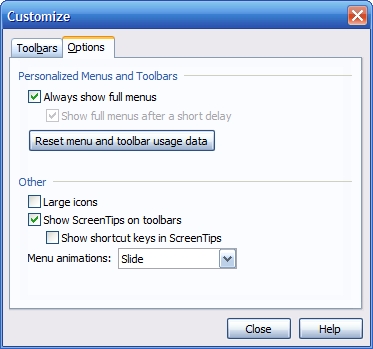
Overview- Change menu and toolbar options.
  • Show full menus checkbox.
  • Reset menu to default.
  • Use large icons.
  • Show tooltips.
  • Show keyboard shortcuts.
  • Change the menu animation style.
Privacy Policy

We collect information from you when you register on our site or fill out a form.

By using our site, you consent to our website privacy policy.

Copyright 2016 ACESoft Integrated Solutions. All Rights Reserved
Designed by: ACESoft