Roll cursor over data fields below for more info
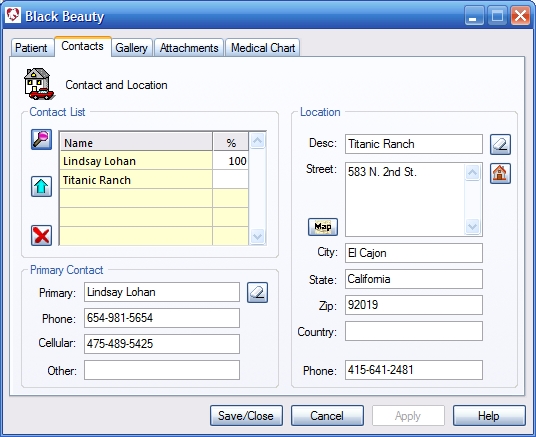
| Overview- Designate which contacts are associated with
this patient. You can set percentages of ownership for each contact for split billing, designate
a primary contact (under whose name the medical records will be logged) and also select a contact that
will serve as the patient location. If adding a new patient to an existing contact, the contact will
be the default primary contact and the patient location will default to the primary location of that
contact.
Contact Lookup Button- opens a contact selection list. Primary Contact Button- Promotes highlighted contact to primary contact. This will be the contact in whose name medical records are made. If no other contact is entered has an ownership percentage the primary contact also becomes the billable agent on invoices. Remove Button- Removes any highlighted items from the list. Primary Contact- Displays the primary contact and their information. This is the person under whose name the medical records will be filed. Erase Button- Clears the Primary Contact. Location- Displays the location of the patient. Erase Button- Clears the patient location. Location Selection Button- Displays a list of all locations of all associated contacts. Highlight and select the desired location. |
 |
We collect information from you when you register on our site or fill out a form.
By using our site, you consent to our website privacy policy.