Roll cursor over data fields below for more info
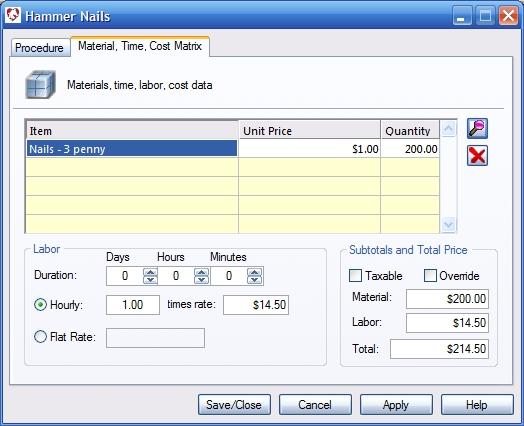
| Overview-Detail cost and materials associated with the procedure. When a procedure is performed, any listed inventory items are deducted from the selected inventory site.
Item - Displays items selected from inventory that are included with this procedure. Unit price - The unit price of the inventory item. Quantity-Quantity of items that are included in the procedure. Selecting a zero quantity allows you to enter the quantity manually when the Procedure is added to a Medical Record. Labor Section: Duration - The amount of time it takes to perform the procedure. When the procedure is selected in an appointment this amount of time will automatically be blocked for the appointment. Hourly- Duration multiplied by the given Hourly rate can be used to calculate the Procedure price. Flat Rate- Select flat rate and enter a labor price. Subtotals and Price Section: Taxable - Check this box if the Procedure is taxable to your customer. |
 |
We collect information from you when you register on our site or fill out a form.
By using our site, you consent to our website privacy policy.