Signup Free Registration Bookmark this site! Subscribe

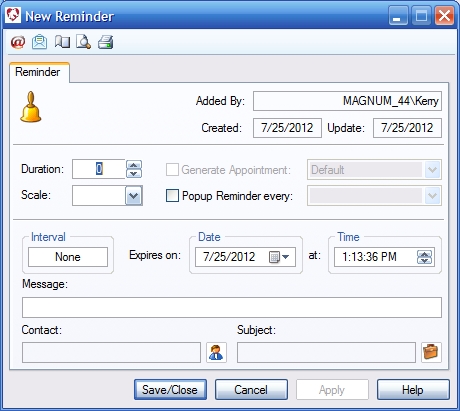
Reminder

Roll cursor over data fields below for more info


Overview- Create reminders for various program modules.

Toolbar

  • Email Options- Set options for emailing this form.
  • Email- Email this form.
  • Page Setup- Set the print options for this form.
  • Print Preview- Preview the form as it will appear printed.
  • Print- Print the form to a connected printer.
Added By- Computer generated - shows who created the record.

Created- Computer generated - shows when the record was created.

Update- Computer generated - shows when the record was last altered.

Generate Appointment on Schedule - Check this box and an appointment will be automatically generated on the selected schedule when the reminder is saved.

Schedule selection - Select the schedule on which to generate an appointment.

Popup Reminder - Check this box to have this reminder generate a pop up alert.

Popup Reminder Time Selection - Select when you want the pop up to occur.

Date - Select a due date for the reminder.
Elapsed Time Selection - Instead of a specific date, select an elapsed time for when the reminder is due.

Time - Select a specific time for the reminder to be due.

Message - Enter the message associated with the reminder. Displays in reports, reminder notices and on generated appointments.

Contact- Select a contact to be associated with the reminder.

Subject- Select a subject to be associated with the reminder.

We collect information from you when you register on our site or fill out a form.

By using our site, you consent to our website privacy policy.

Copyright 2016 ACESoft Integrated Solutions. All Rights Reserved
Designed by: ACESoft