Roll cursor over data fields below for more info
|
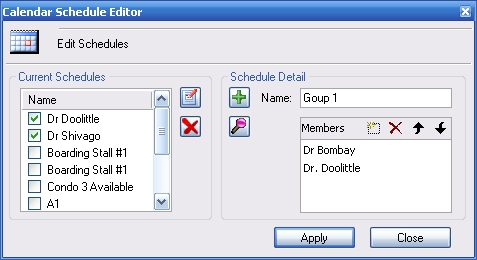
Overview- Select one or any combination of schedules to be displayed on the schedule calendar.
Current Schedules- Displays the list of schedules available for display. Put a check in the box beside the ones you wish to view. Selecting default will display all appointments in one calendar view. Edit Button- Opens the selected schedule to edit the name or the members. Remove Button- Removes the schedule from the list. Add Button- Adds the new schedule to the list. Lookup Button- Opens the employee list to choose from to create a schedule group. Name- Enter the name of a new schedule Members- Displays the membership list for the schedule. Apply- Applies the selected schedules to the visual calendar view. |
 |
We collect information from you when you register on our site or fill out a form.
By using our site, you consent to our website privacy policy.